 How to Activate PowerTerm WebConnect How to Activate PowerTerm WebConnect
Where can I find the Serial Number?
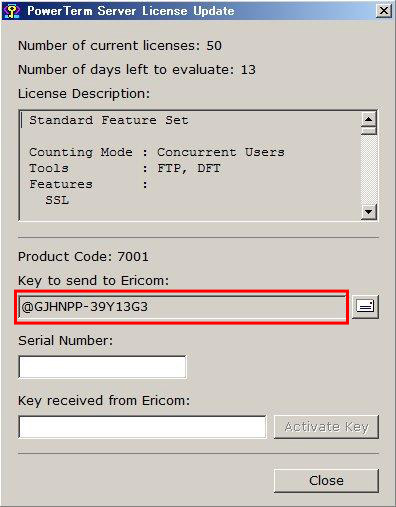
Where can I find the Key to Send to Ericom
How to Activate PowerTerm WebConnect?
- Open Start - > All programs> Ericom Software -> PowerTerm Server License Update dialog to retrieve "Key to send to Ericom"
- On Ericom Website Activation page (https://www.ericom.com/activation.asp), fill in the "Key to send to Ericom" and "Serial Number", click "Continue" in order to generate "activation code ("Key received from Ericom")
- In the product's "license Update" dialog, Enter the 'Key received from Ericom' and the 'Serial Number' in the appropriate fields, and then click the 'Activate Key' button
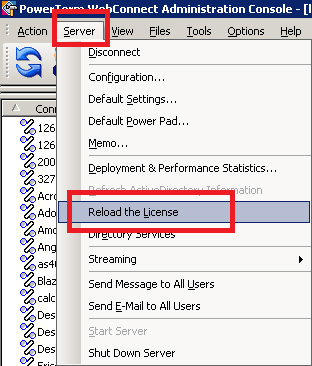
- Restart the PowerTerm WebConnect Service or go to PowerTerm WebConnect Administration Console / Server / Reload the License:
Where can I find the Serial Number?
Your Serial Number can be found on your:
- License Agreement
- Email receipt
- PowerTerm CD sleeve
Where can I find the Key to Send to Ericom?
The Key to Send to Ericom can be found on the PowerTerm Server License Update dialog.
1. Start> All programs> Ericom Software > PowerTerm Server License Update dialog
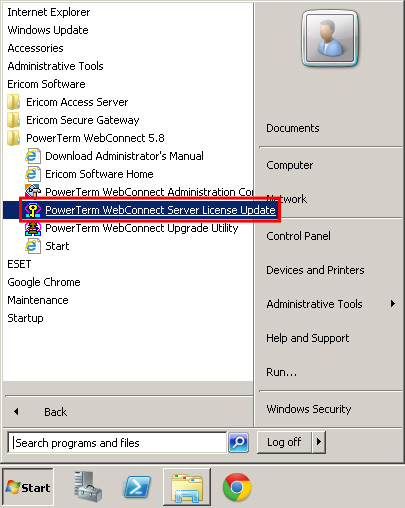
2. From the PowerTerm Server License Update dialog, copy the "Key to send to Ericom"
_______________________________________________________________________________________________________________
1The Serial Number appears in the license agreement (pdf) you received from Ericom when you purchased your product.
|
